Check Grid Before Savev5
This action prevents the form from being saved until at least one row has been added to the Grid.

Properties
Description: Specifies a description for the action.
Message Content: Specifies the message displayed when the validation fails.
Run Condition: If the query entered in this field returns '0', the action will not be executed.
Request Confirmation: Determines whether confirmation is required before executing the action. When enabled, the Confirmation Message property becomes available, allowing you to define the message displayed to the user.
Example
Suppose your form contains a Grid control.

If at least one row must be entered into the Grid before the form can be saved, assign the Check Grid Before Save action to the form's Before Recording event.
In the Message Content property, enter the warning message that will be displayed if the Grid is empty.
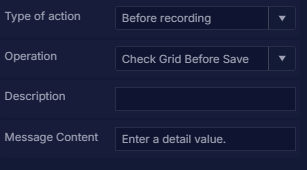
When the user attempts to save the form without adding any rows to the Grid, the save operation is cancelled and the specified warning message is displayed in the Client.
 AI Assistant