Open Form - Linkedv5
The Open Form - Linked action is used to open another form from the same project or a different project while maintaining a relationship between the current form and the opened form.

Notes
This action enables data from the current form to be linked to fields in another form. It is commonly used when additional information needs to be entered after the main record has been created.
For example, each line of a sales order can be linked to a separate form where batch numbers, serial numbers, or image attachments are stored.
Properties
Condition: Specifies how the linked form will be opened.
- In the same tab: Opens the form in the current tab.
- In new tab: Opens the form in a new tab.
- In new window: Opens the form in a separate window.
Description: Enter a description for the action. This field serves as a reference for developers.
List Heading: Specifies the title of the opened list.
Form Title: Defines the title displayed on the opened form.
Form Width: Specifies the width of the opened form.
Form Height: Specifies the height of the opened form.
Module: Select the project containing the form. Leave this field empty if the target form belongs to the current project.
Form: Select the form to be opened.
Mapping List: Selects the list whose data will be transferred to the linked form.
Mapping: Maps fields between the current form and the linked form.
Closing Action: Selects an action to execute when the linked form is closed.
Fullscreen: Determines whether the linked form opens in full-screen mode.
Save when turned on: Automatically saves the current document when the linked form is opened.
Delete when turned on: Deletes the current document when the linked form is opened.
Form Hide: Determines whether the opened form is visible to the user.
AutoSave: Automatically saves the linked form immediately after it is opened. When enabled, the linked form is opened and saved in the background without displaying any user interface.
Run Condition: If the SQL query entered in this field returns 0, the action will not execute.
Request Confirmation: Determines whether the user must confirm before the action is executed. When enabled, a confirmation message is displayed.
Example
For this example, create two forms.
The first form will store the data and contains:
- Three Text Box controls
- Three Figures Box controls
The third Figures Box will store the record's unique identifier (UID).
Enter and save several records in this form..

The second form contains:
- A Button
- A Figures Box that will receive the record ID
When the button is clicked, the selected record ID is passed to the linked form, which then loads the corresponding record.
Configure the button with the following action:
Client view

Understanding Mapping
The Mapping property transfers data from the current
form to the linked form.
The format is:
SourceField|ConstantValue|TargetField
Example:
uid|0|id
Where:
- uid
is the control (UID) on the current form.
- 0
is the constant value parameter.
- id
is the destination control on the linked form.
When the linked form opens, the value of uid is
automatically copied into the id field of the target form.
Example
Current Form:
- CustomerId
control (UID: uid)
Linked Form:
- CustomerId
Figures Box (ID: id)
Mapping:
uid|0|id
As a result, the CustomerId value from the current form is automatically populated into the CustomerId field of the linked form.
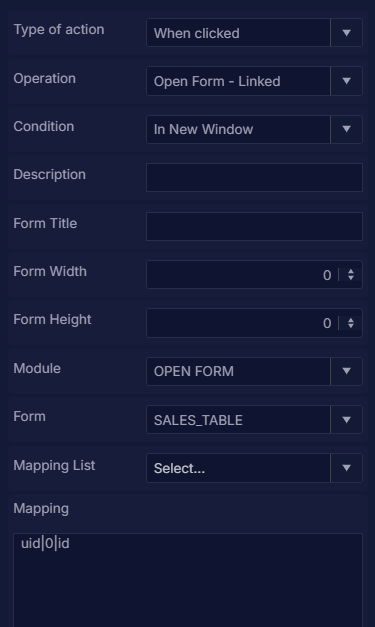
Open Form Linked view
Next, add an action to the ID Figures Box on the linked form.
This action uses the mapped ID value to retrieve the corresponding record automatically when the form opens.
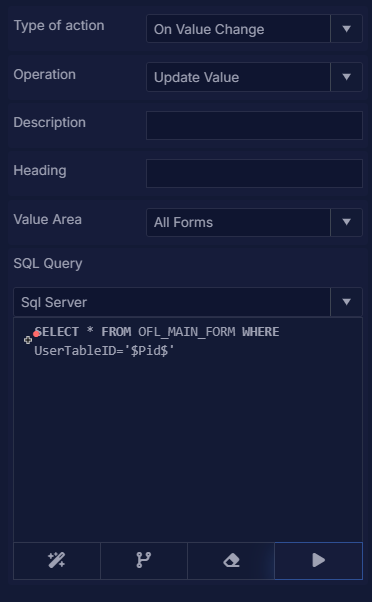
Action details for ID Figure Box
After saving both forms:
- Open the Client.
- Enter the desired record ID into the ID field.
- Click the Open Form - Linked button.

The linked form opens and automatically loads the record associated with the specified ID.
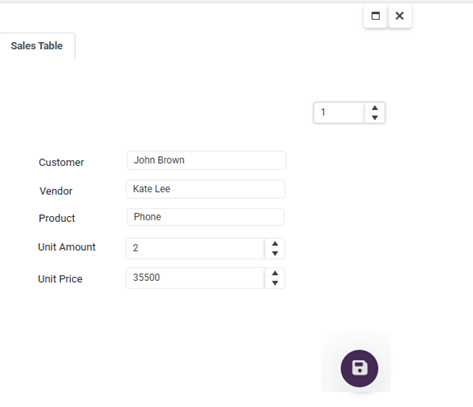
Open form Linked view
Mapping with SQL Query
In addition to Form Field and Constant Value, the Mapping property also supports SQL Query.
This allows values to be retrieved dynamically from the database and passed directly to the linked form during the mapping process.
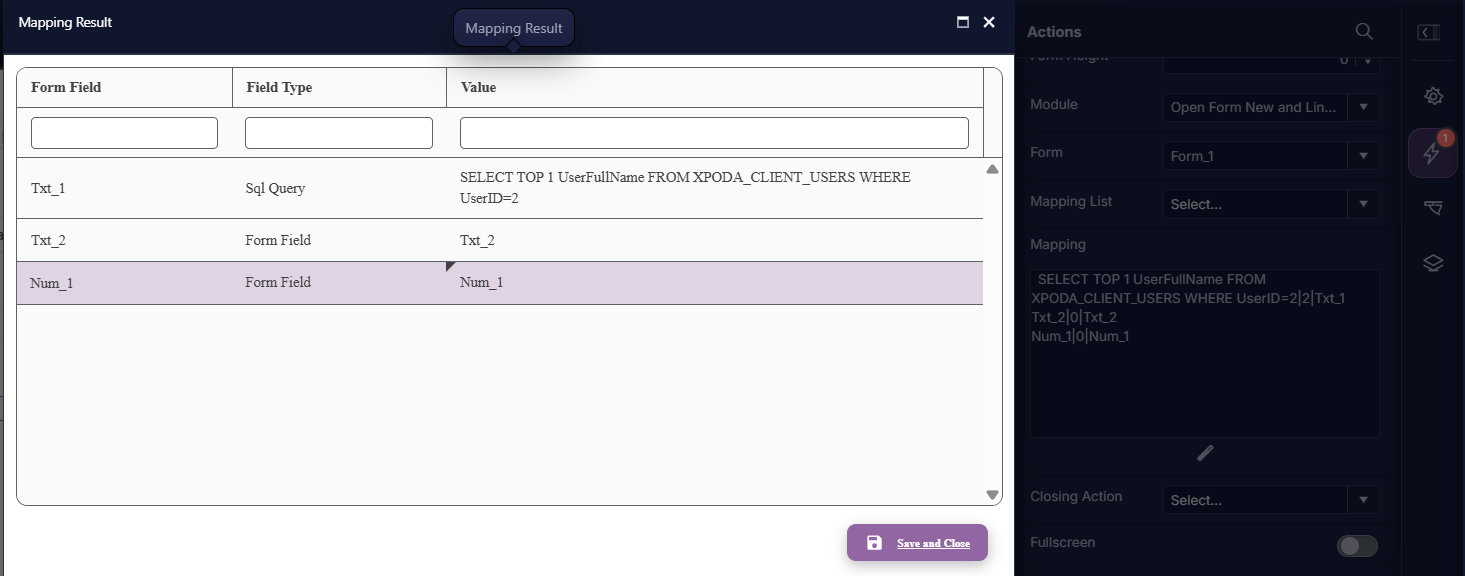
 AI Assistant