Show Record Messagesv5
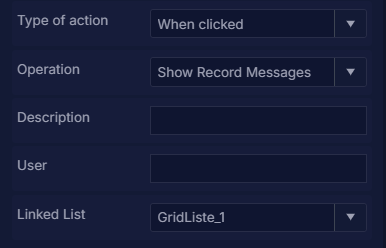
The Show Record Messages action opens the messaging window for the selected record.

Show Record Messages Action in the Toolbox
Properties
Description: Enter a description for the action.
This description is displayed as a tooltip when the mouse pointer hovers over the action, helping developers understand its purpose.
User: Specifies the user associated with the messaging action.
Linked List: Selects a list from the form. The messaging window is opened for the record selected in the specified list.
Run Condition: If the query entered in this field returns 0, the action will not be executed.
Request Confirmation: Select whether confirmation should be requested before the action is executed. When Request Confirmation is enabled, the Confirmation Message property becomes available, allowing you to specify the message displayed in the confirmation dialog.
Example
To use this action, the Chat Actions option must first be enabled in the User Options menu on the Client home page. Activation of this feature requires the appropriate authorization from the XPODA administrator.

Configure a button with the When Clicked → Show Record Messages action.
Associate the action with a user list by selecting the appropriate list in the Linked List property.
When the button is clicked, the messaging window for the selected record is opened.
 AI Assistant