Documentv5
This flow control comes ready on the flow screen. It is a standard control. This control indicates which form document will be included in the flow.

Flow Items view

Design screen view
Notes
This flow control is not connected to other flow controls. Therefore, no arrow appears on the control when hovering over it with the mouse.
Properties
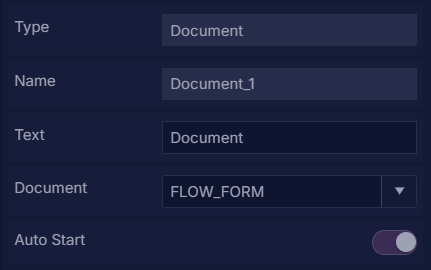
Text: The text displayed on the screen is entered here.
Document: Select the form. If Auto Start is set to Yes, the flow will start when this form is saved.
Auto Start: If enabled, the flow starts automatically when the document is saved. If set to No, the flow does not start automatically when the document is saved. In this case, you can create a Start Flow action through an event on the relevant form to start the flow. For example, a button can be created for the Start Flow action, followed by a When Clicked event.
Example Usage
The Document control is placed on the screen to select the flow document without a connection before the Start control.
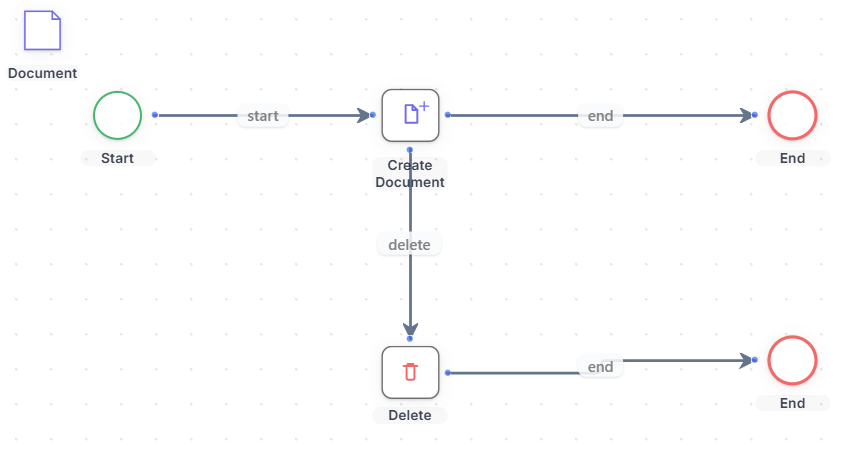
Flow screen
The relevant form is selected from the Document property. To start the flow when the form is saved, the Auto Start property must be enabled.
Document tool properties
This control enables the selection of the flow form. The control is independent within the flow.
 AI Assistant