Grid – Delete Rowv5
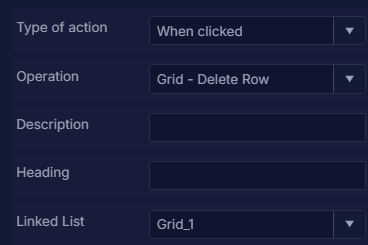
The Grid – Delete Row action deletes the selected row(s) from the grid.

Properties
Description:
Enter a description for the action.
Heading:
Specifies the name displayed in the action list when the action is added as a Form Action.
Linked List:
Select a list from the form. The action is performed on the selected row(s) of the specified grid or list.
Run Condition:
If the SQL query entered in this field returns '0', the action will not be executed.
Request Confirmation:
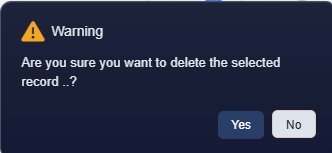
Determines whether the user is prompted for confirmation before the action is executed. If enabled, the Confirmation Message property becomes available, allowing you to specify the message displayed to the user.
Example Usage
Assume that your form contains a Grid control.
Create a button and assign the Grid – Delete Row action to its When Clicked event. Select the target grid in the Linked List property.
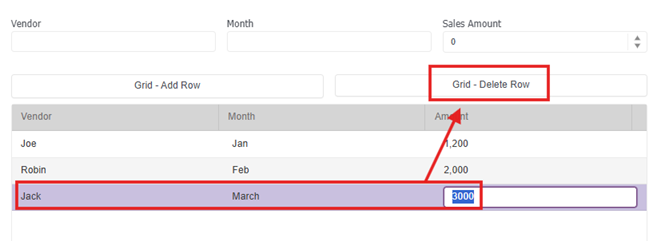
Select one or more rows in the grid, then click the Delete Row button.
A confirmation message is displayed. Click Yes to proceed.
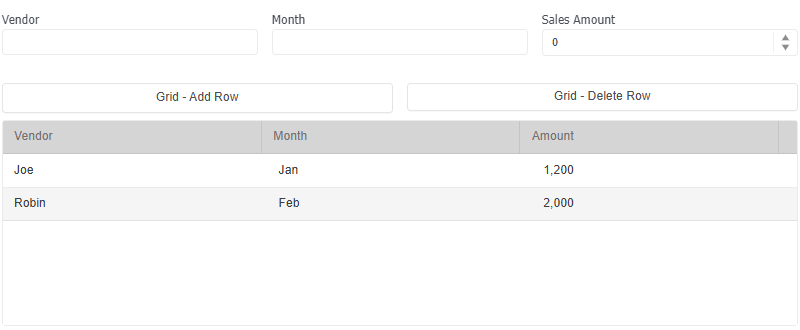
The selected row(s) are then removed from the grid.
 AI Assistant