Open Form - Appendixv5
he Open Form - Appendix action is used to open an additional form linked to the current (main) form. This allows supplementary information to be entered and stored while maintaining a relationship with the main record.

Properties
Condition: Specifies how the appendix form will be opened.
- In the same tab: Opens the form in the current tab.
- In New Tab: Opens the form in a new tab.
- In New Window: Opens the form in a separate window.
- In the Right Panel: Opens the form in the right panel of the current window.
Description: Enter a description for the action. This field serves as a reference for developers.
Form Title: Specifies the title displayed on the opened form.
Module: Select the project containing the target form. Leave this field empty if the form belongs to the current project.
Form: Select the appendix form to be opened.
Mapping List: Selects the list whose data will be transferred to the appendix form.
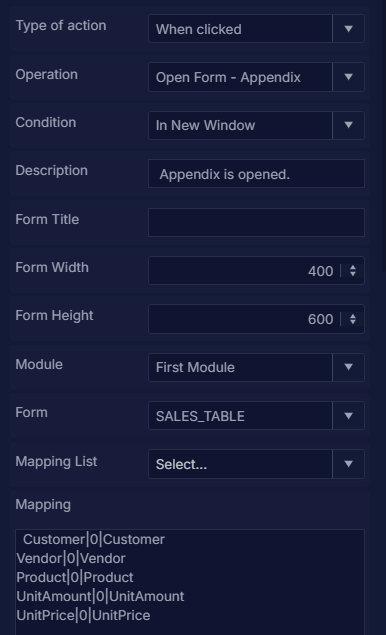
Mapping: Maps fields from the current form or list to the corresponding fields in the appendix form.
Appendix Data Type: Specifies whether data is transferred from the Form or from a List.
Appendix Form ID Field: Specifies the ID field in the appendix form that will receive the UserTableID of the main form. This ensures that the appendix record is correctly linked to its parent record.
Appendix Form Type Field: Specifies the field in the appendix form that will receive the FormTypeID of the main form. This ensures that the appendix record is associated with the correct form type.
Closing Action: Selects an action to execute when the appendix form is closed.
Fullscreen: Determines whether the appendix form opens in full-screen mode.
Save When Opened: Determines whether the current document is automatically saved before opening the appendix form.
Delete When Opened: Determines whether the current document is deleted when the appendix form is opened.
Hide Form: Determines whether the appendix form is displayed to the user.
Run Condition: If the SQL query entered in this field returns 0, the action will not execute.
Request Confirmation: Determines whether the user must confirm before the action is executed. When enabled, a confirmation message is displayed.
Example
Assume the project contains two forms:
- A Main Form
- An Appendix Form
After entering data into the main form, the user clicks the Open Form - Appendix button.
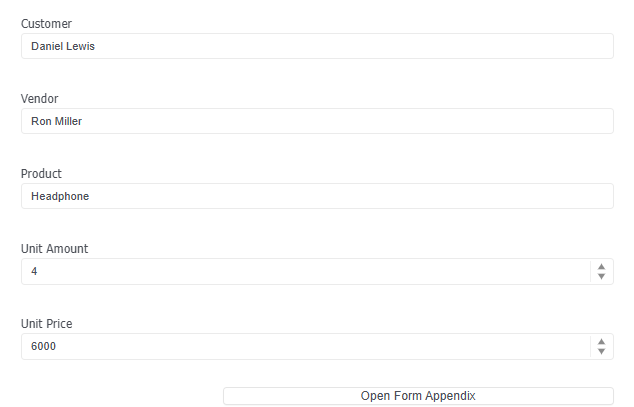
Client view
Configure the button with the Open Form - Appendix action.
Set the Save When Opened property to Yes.
When the button is clicked:
- The current document is automatically saved.
- The appendix form opens.
- The user enters the additional information.
4. After the appendix form is saved, it automatically closes.
5. The appendix record remains linked to the main form through the mapped UserTableID and FormTypeID fields.
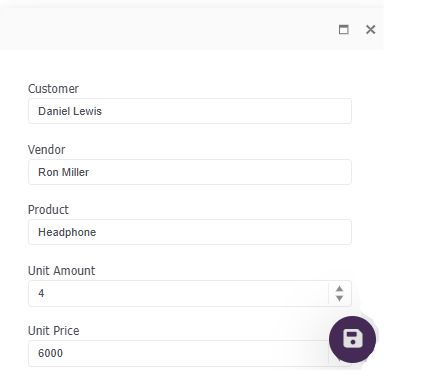
Client view
 AI Assistant