Send Mobile Notificationv5
The Send Mobile Notification action will be available starting with XPODA 5.1. It is currently under active development. You can continue your implementations with this upcoming feature in mind.
The Send Mobile Notification action sends push notifications to mobile devices associated with selected users.

Send Mobile Notification Action in the Toolbox
Properties
Description: Enter a description for the action.
Heading: Specifies the name displayed in the Actions list when the action is added as a form action.
Notification Message: Specifies the content of the push notification.
Users: Specifies the user IDs of the recipients who will receive the notification.
Run Condition: If the query entered in this field returns 0, the action will not be executed.
Request Confirmation: Select whether confirmation should be requested before the action is executed. When Request Confirmation is enabled, the Confirmation Message property becomes available, allowing you to specify the message displayed in the confirmation dialog.
Example
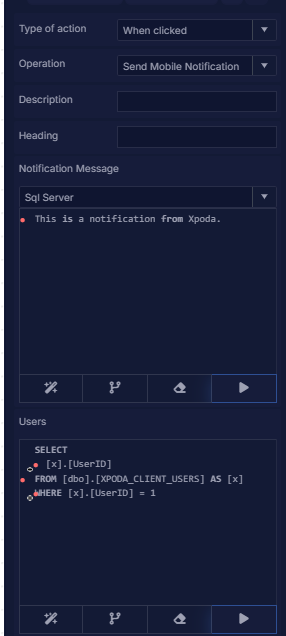
To send a mobile notification, add a button to the form and configure it with the When Clicked → Send Mobile Notification action.
Enter the notification text in the Notification Message field.
Specify the recipients by entering their user IDs from the XPODA_CLIENT_USERS table in the Users field.
For notifications to be delivered successfully, the UserPhone column in the XPODA_CLIENT_USERS table must contain valid phone number data for the selected users.
 AI Assistant