Show Content Reportv5
The Show Content Report action is used to display the content of a report created in a different form.

Show Content Report Action in the Toolbox
Properties
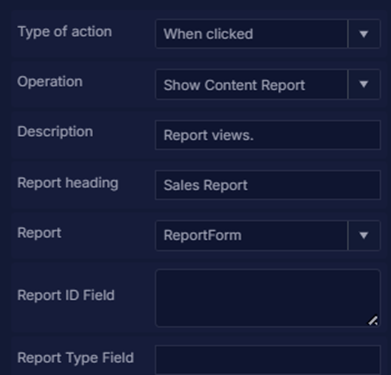
Description: Enter a description for the action.
Report Title: Specifies the title displayed for the report.
Report: Selects the report form from the report forms created within the project.
Report ID Field: Specifies the field where the ID value of the report form matches the ID field of the target report form.
Report Type Field: Specifies the field where the type value of the form matches the type field of the report form.
Run Condition: If the query entered in this field returns 0, the action will not be executed.
Request Confirmation: Select whether confirmation should be requested before the action is executed. When Request Confirmation is enabled, the Confirmation Message property becomes available, allowing you to specify the message displayed in the confirmation dialog.
Example
In this example, there is a button named Show Report Content.
The When Clicked → Show Content Report action is configured for this button.
When the user clicks the button, the report form opens and the related report content is displayed.
After clicking the button, the report form screen is opened.
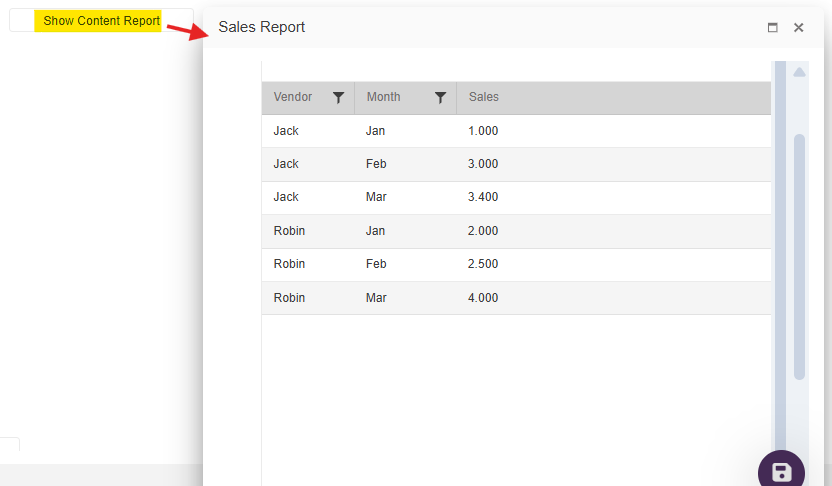
Client View
 AI Assistant