Validate Fieldv5
The Validate Field action is used to validate whether a numeric value falls within a specified minimum and maximum range. If the entered value is outside the defined range, a warning message is displayed.

Validate Field Action in the Toolbox
Properties
Description: Enter a description for the action.
Heading: Specifies the name displayed in the Actions list when the action is added to a form.
Minimum: Specifies the minimum allowed value for the selected field.
Maximum: Specifies the maximum allowed value for the selected field.
Warning Message: Specifies the warning message displayed when the entered value is outside the defined minimum or maximum range.
Run Condition: If the query entered in this field returns 0, the action will not be executed.
Request Confirmation: Select whether confirmation should be requested before the action is executed. When Request Confirmation is enabled, the Confirmation Message property becomes available, allowing you to specify the message displayed in the confirmation dialog.
Example
In this example, a Numeric Box control is used.
Add the Validation → Validate Field action to the Numeric Box. Then specify the allowed value range by entering the minimum and maximum values in the Minimum and Maximum fields.
For this example:
- Minimum:
0 - Maximum:
100
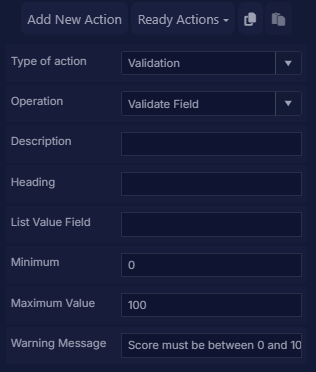
The Validate Field action prevents users from entering values outside the specified range.
 AI Assistant