Find Userv5
This flow control enables finding users. To use the flow control, drag it from the menu on the left to the design screen.

Flow Items view

Design screen view
Notes
The next flow control after this control is used to send something or send an approval. This control has a Connection at the end. The Resource Results of the Connection must be selected as No Requirement.
Properties
Text : The text displayed on the screen is entered here.
Type of Operation: The approval type is selected. If AND is selected, all selected users must complete the approval. If OR is selected, the approval of at least one of the selected users is required.
SQL Query: This is the section where the SQL query containing the UserID fields is entered.
Example Usage
When you add this flow control to the screen, it appears as shown below. The operation type is selected as AND. Therefore, this control sends the next flow step to all users whose IDs are specified. This control determines the users to be selected for the next flow control.
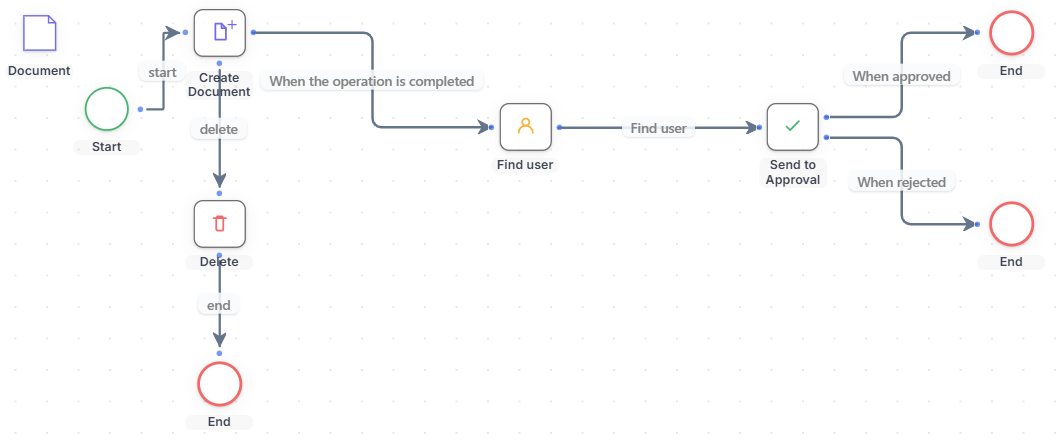
In the SQL Query field, enter UserID. These UserID values can be filtered using a WHERE clause. One or more users can be selected by UserID.
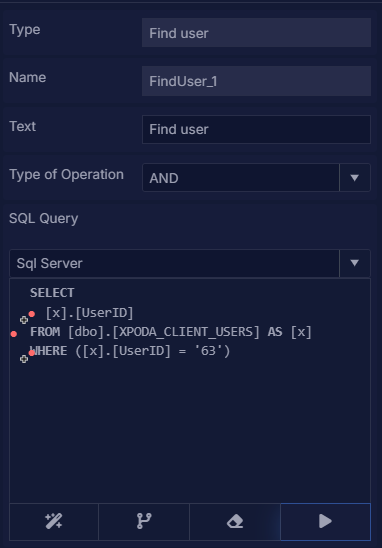
Finding users through the query
 AI Assistant