Flow Hintsv5
FlowState
FlowState is the section that indicates the status of the flow.
- When FlowState = 0, the flow is pending.
- When FlowState = 1, the flow is in progress and has a positive result according to the end user's decision.
- When FlowState = 2, the negative option among the options presented to the end user has been selected.
- When FlowState = 4, it indicates that after the approval notification is sent to multiple users connected with OR, once one of them approves or rejects it, the system processes the other users accordingly.
FlowProses
FlowProses is the code of the relevant process. The descriptions of the codes are as follows:
- a1 = Start
- a2 = End
- a4 = Formula
- a7 = Create Document
- a13 = Find User
- a17 = Send Email
- a22 = SubFlow
- a23 = Send Approval
- a24 = Task Form
- a26 = DbQuery
An example query that can be used to report the Approval Status and flow report in a list is as follows:
SELECT
TN .UserTableID,
TN .DocNo,
TN .CreateUser,
TN .CreateDate,
TN .Defination,
CASE WHEN MAX(FlowState)=1 THEN ‘Approved’
WHEN MAX(FlowState)=2 THEN ‘Rejected’
ELSE ‘Pending’ END AS FlowStatus
FROM TABLENAME AS TN WITH (NOLOCK)
LEFT JOIN XPODA_WORK_FLOWS WITH F (NOLOCK) ON F.FlowDocumentID = TN.UserTableID AND F.FlowProjectID = TN. ProjectID
WHERE FlowProses = 'a23' AND FlowState in (0,1,2) AND FlowUserID!=’$PActiveUser$’
If the approval process is sent to multiple users, a GROUP BY statement can be added to prevent duplicate records in the status field as a result of the query.
In the example above, records that have passed the approval of the Active User are filtered in the query instead. If FlowUserID is removed and GROUP BY is added, the approval status of all users will be displayed.
/*group by*/
GROUP BY
TN.UserTableID,
TN.DocNo,
TN.CreateUser,
TN.CreateDate,
TN.Defination
For multiple approval processes, the flow status information of a specific approval can be displayed by using FlowItemText = 'Manager Approval', for example.
- To check whether the flow has started, when we write a query that retrieves the FlowDocumentID and FlowProjectID records, the records returned by the query indicate that the flow exists and has started. An example query is as follows:
SELECT CASE WHEN EXISTS(
SELECT * FROM XPODA_WORK_FLOWS
WHERE FlowDocumentID = '$PUserTableID' AND FlowProjectID= TABLENAME.ProjectID)
THEN 0 ELSE 1 END
Note: The flow must always be checked together with the ProjectID and UserTableID fields. Since one flow can be added for each project, these two fields must be used together in join queries or validations to distinguish the flow of each form.
Note: We can use $P to check the flow of the saved data in the form.
| To prevent system records from appearing when listing, FlowUserID != 0 can be used as a filter. If FlowUserID != 0 is added to the query, only users will be listed and system pending records will not be displayed. |
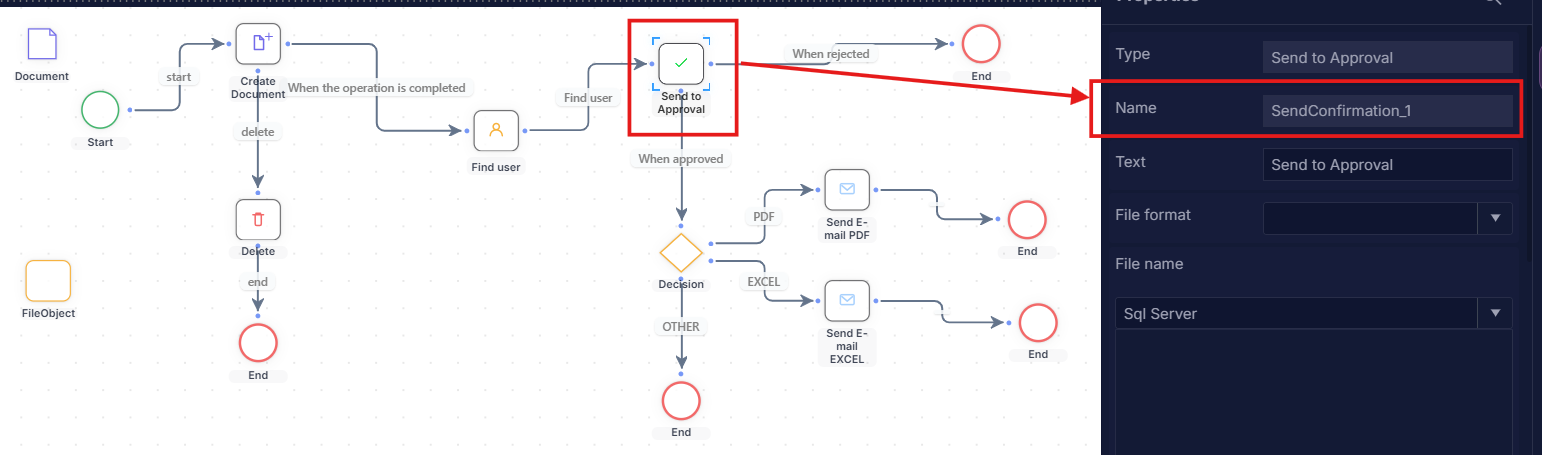
The Name field in the properties of the flow elements indicates the FlowItemName object name of the relevant element |
 AI Assistant