Show E-mail Logsv5
The Show E-mail Logs action is used to view and manage the logs of emails sent through the form.With this action, email logs related to the form can be viewed, deleted if necessary, and resent via email.

Show E-mail Logs Action in the Toolbox
Properties
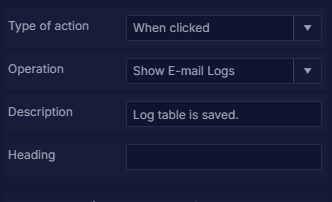
Description: Enter a description for the action.
Heading: Specifies the name displayed in the Actions list when the action is added as a form action.
Run Condition: If the query entered in this field returns 0, the action will not be executed.
Request Confirmation: Select whether confirmation should be requested before the action is executed. When Request Confirmation is enabled, the Confirmation Message property becomes available, allowing you to specify the message displayed in the confirmation dialog.
Example
Add a button to the form page and configure its properties as shown below.
If an email cannot be sent, the errors can be viewed from the XPODA_MAIL_LOGS table.
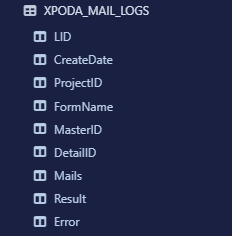
Query Builder View
 AI Assistant