Objectv5
This flow control creates an object using an SQL query. Other flow controls use this object control in their queries or properties.

Flow Items view

Design screen view
Notes
This control does not have any Connection.
Properties
Text: The text displayed on the screen is entered here.
SQL Query: Enter the SQL query for the object. The query includes an alias so that the object can be referenced and used by other controls.
Example Usage
When you add an Object flow control to the design, you can change its text. For example, you can add an Object as shown below.
This Object control is used in the conditions of the Decision (Formula) control. It allows the object to be used as a condition.
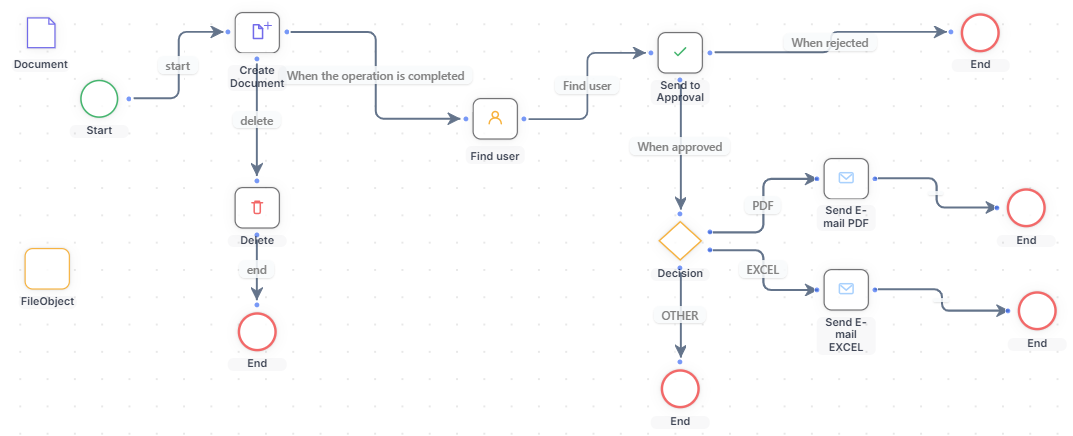
Flow screen
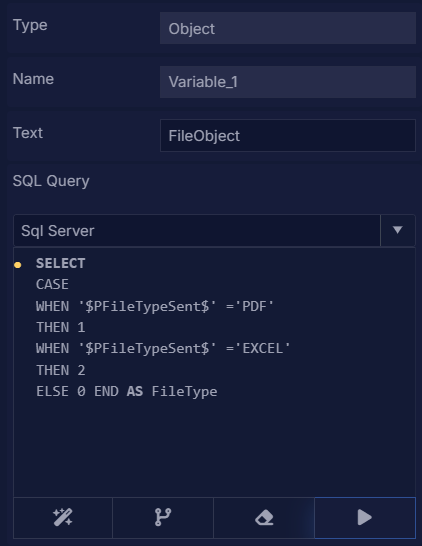
The Object SQL Query used in this example is shown below. Here, "FileTypeSent" represents the name of the drop-down list in the related form.
The Decision flow control contains three conditions in this example. These conditions are configured to use the Object control. The second part specifies the alias of the Object query.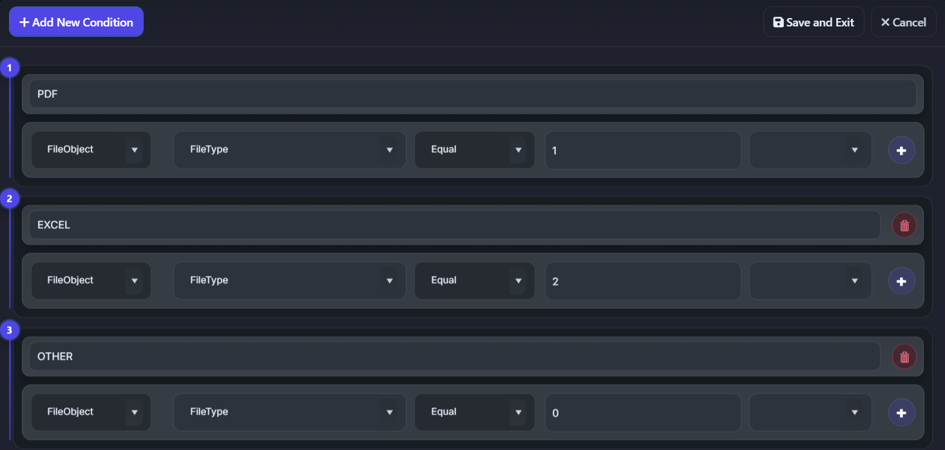
Formula operations of the Decision control
 AI Assistant